
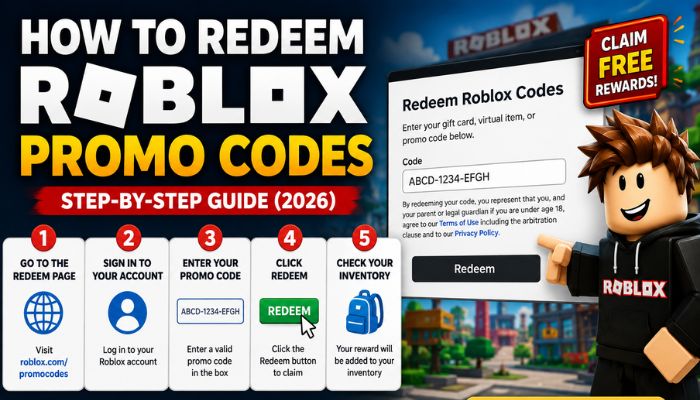
Roblox promo codes give you free items just for typing a short string of text into a box. No payment, no waiting, no catch, just avatar accessories, cosmetics, and occasionally in-game currency dropped straight into your account. The tricky part is knowing where each type of code goes, because Roblox promo codes, gift cards, and game-specific codes all work differently and get redeemed in completely different places.
This guide walks through every redemption method, explains why codes sometimes fail, and points you toward where to find fresh ones. By the end, you will know exactly which code goes where and how to claim every free reward without wasting time on the wrong page.
Table of Contents
What are Roblox promo codes?
A Roblox promo code is a short alphanumeric string released officially by Roblox that unlocks a free avatar item when entered on the Roblox website. These are different from two other things players often mix them up with. Roblox gift cards are prepaid cards, either physical or digital, that add Robux balance to your account once redeemed. They are a payment method, not a reward system. Entering a gift card code adds currency you can spend, while a promo code adds a cosmetic item directly without touching your Robux balance.
Roblox game codes are entirely separate from both. These are released by individual game developers, not Roblox itself, and only work inside that specific game. A code for Anime Vanguards will do nothing on the Roblox website, and a Roblox promo code will do nothing inside Anime Vanguards. Each system is closed off from the other.
For the most current list of active platform-wide codes, check our latest Roblox promo codes page, which is updated as new ones are released.
How to redeem Roblox promo codes?
Redeeming a Roblox promo code takes under a minute once you know where to go. Here is the process from start to finish.
Step 1 — Visit Roblox’s promo code redemption page. Go to roblox.com/promocodes. This is the only page where platform-wide promo codes are accepted. Bookmarking it saves time if you redeem codes regularly.
Step 2 — Sign in to your Roblox account. You need to be logged in for the redemption to apply to your account. If you are not signed in, the page will prompt you before allowing you to enter anything.
Step 3 — Enter a valid promo code. Type or paste the code into the text field provided. Copying and pasting is safer than typing manually, since a single mistyped character will cause the redemption to fail.
Step 4 — Click redeem. Once the code is entered correctly, click the Redeem button. A confirmation message appears on screen if the code is valid and has not been used on your account before.
Step 5 — Check your inventory. The reward does not always show up instantly in the avatar editor. Head to your inventory and look under the relevant category, accessories, gear, or hats, depending on what the code unlocked. If it is not visible immediately, refresh the page or wait a few minutes.
Pro tip: Roblox promo codes are case-sensitive. A code typed in the wrong case will return an error even if every letter is technically correct. Also, keep in mind that expired codes will not work no matter how correctly they are entered. Roblox does not bring dead codes back once they close.
How to redeem Roblox gift cards?
- Gift cards add Robux to your account balance and follow a different redemption path than promo codes.
- Scratch codes — Physical gift cards bought from retail stores have a code hidden under a scratch-off panel. Scratch this off carefully, as a damaged code cannot always be read correctly during redemption.
- Digital gift cards — These arrive as an email or a code displayed on screen after an online purchase. No physical scratching involved just copy the code as shown.
- Redemption process — Go to roblox.com/redeem, sign in to your account, and enter the gift card code into the field provided. Click Redeem. The Robux value gets added to your account balance immediately, and you can check your current balance from the top of any Roblox page. Unlike promo codes, gift card codes do not expire once purchased, though Roblox may set a redemption window depending on where the card was bought.
Why are Roblox promo codes not working?
If a code is not going through, the issue almost always falls into one of four categories.
- Expired codes — This is the most common reason by far. Roblox closes promo codes without warning, and once a code expires, there is no workaround. If a code was being shared online weeks ago, there is a good chance it is already dead.
- Typing errors — Promo codes are case-sensitive. Uppercase and lowercase letters are treated as different characters, so a code entered with the wrong capitalisation will fail even if every letter matches. Pasting directly avoids this entirely.
- Already redeemed — Each promo code can only be claimed once per account. If you redeemed a code previously even a long time ago entering it again will return an error, regardless of whether the code is still active for other users.
- Account problems — Occasionally, a code fails because of an account-level restriction rather than the code itself. This can include accounts that are too new, accounts with certain privacy settings enabled, or temporary login issues on Roblox’s end. If a code fails despite being correctly entered and confirmed active, signing out and back in, or trying again after some time, can resolve it.
Difference between promo codes and game codes?
| Feature | Promo codes | Game codes |
| Redeemed on Roblox website | Yes | No |
| Redeemed inside game | No | Yes |
| Rewards avatar items | Usually | Sometimes |
| Rewards game currency | Rarely | Common |
The simplest way to remember this — if you are not sure where a code goes, check whether it came from Roblox directly or from a specific game’s developer. Roblox-issued codes go to roblox.com/promocodes. Developer-issued codes go inside that game.
Where to find new Roblox promo codes?
New promo codes do not follow a predictable schedule, but a few sources consistently surface them first.
- Official Roblox promotions — Roblox occasionally partners with brands, films, or events, and these partnerships often come bundled with exclusive promo codes tied to the collaboration.
- Developer events — Roblox conferences, anniversaries, and major platform announcements sometimes come with promo codes as part of the celebration.
- Roblox gift cards — Some physical and digital gift cards include bonus promo codes printed alongside the main Robux code, giving you an avatar item on top of the currency.
- Updated code websites — Pages that track Roblox promo codes regularly, like our own Roblox promo codes page, are checked and refreshed as soon as new codes are confirmed, with expired ones removed promptly.
Latest Roblox code guides
If you are looking for codes for a specific game rather than platform-wide promo codes, these guides are kept current with active codes, redemption steps, and troubleshooting for each one:
- Roblox Promo Codes — All active platform-wide codes in one place
- Dress To Impress Codes — Outfits, accessories, and collab items
- Anime Vanguards Codes — Gems, Trait Rerolls, and Memoria Shards
- Blade Ball Codes — Wheel spins, sword skins, and luck boosts
- Death Ball Codes — Coins, boosts, and cosmetics
- Build A Boat Codes — In-game currency and item rewards
- Island of Move Codes — Free avatar accessories
Frequently asked questions
Where do I redeem Roblox promo codes?
At roblox.com/promocodes, while signed into your Roblox account. This is the only page that accepts platform-wide promo codes — they will not work inside individual games.
Can Roblox promo codes expire?
Yes, Roblox closes codes without any advance notice, and expired codes cannot be reactivated. If a code was circulating online a while ago, check whether it is still listed as active before trying it.
Are Roblox promo codes free?
Yes, completely. Promo codes only unlock cosmetic items; they do not cost Robux to redeem and do not require any purchase.
Why does Roblox say my code is invalid?
The three most common causes are incorrect capitalisation, an expired code, or a code that has already been redeemed on your account. Double-check the code against an active list and make sure you are pasting it exactly as shown.

